I tried Manjaro - KDE. After installing it in a VM I couldn’t change the screen resolution. I searched online and realized I had never set it up properly.
Writing down what I did.
Normal Process
- Install a
ManjaroVM. - Set up proxy. See Note: Linux Proxy Settings.
- Install VirtualBox Guest Additions. See ArchWiki - VirtualBox - 2.2 Install the Guest Additions.
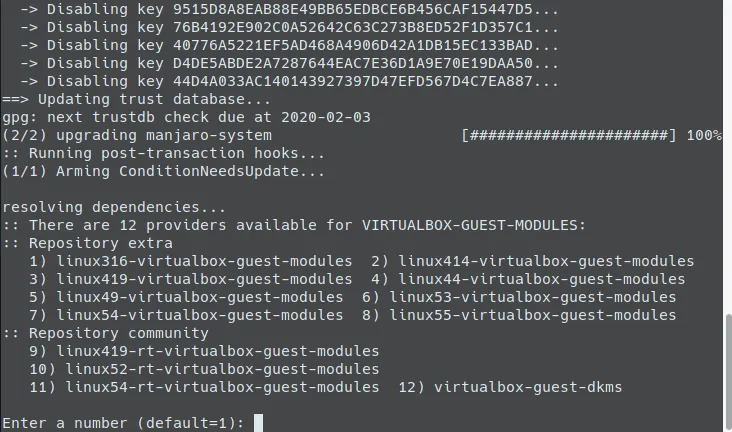
sudo pacman -S virtualbox-guest-utilssudo pacman -S xf86-video-vmwaresudo pacman -S linux-lts-headers- The first command asks you to choose a module. I didn’t see
virtualbox-guest-modules-archmentioned in the wiki, so I picked12.
- Set VirtualBox to auto-resize display. Reference: Manjaro guest on VirtualBox not able to get the full resolution
- Shut down the VM.
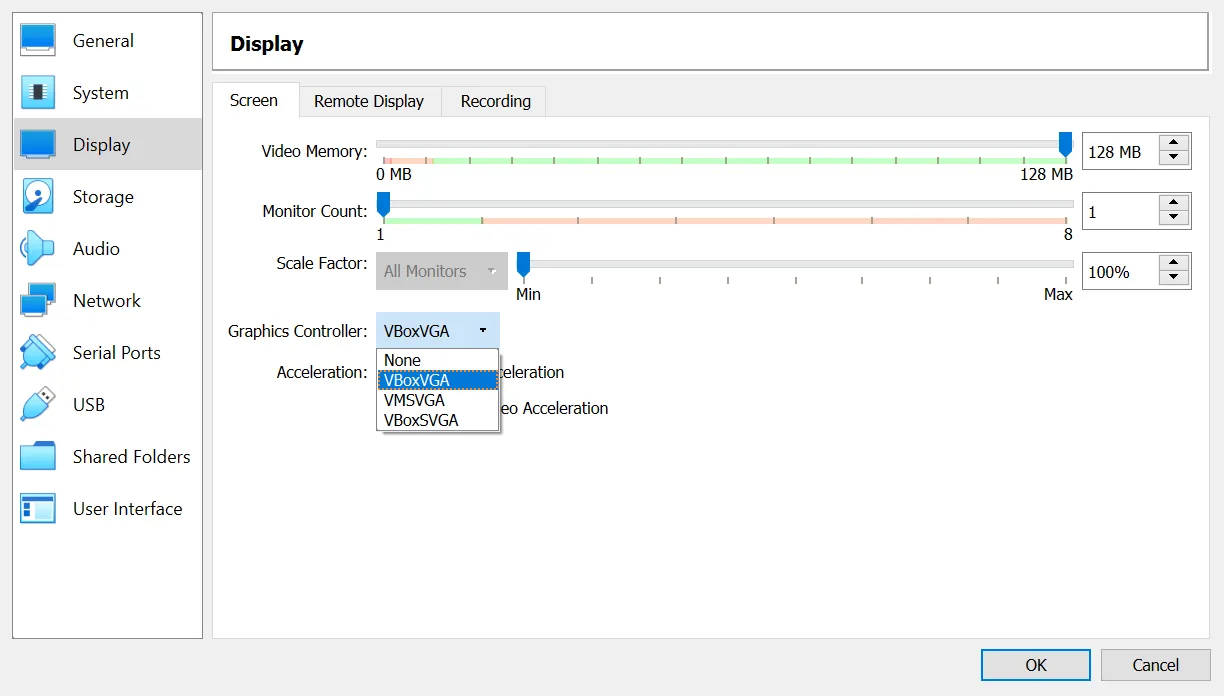
- VM settings -> Display -> Graphics Controller -> choose
VBoxVGA, save.
- Boot the VM, resize the window a bit, then the screen goes black.
- Press
Ctrl Alt F2to open another tty console, log in. sudo mhwd -r pci video-vmwarereboot
After that, you can freely change the VM window size.
(Among Manjaro’s three desktop environments: xfce is the lightest, installs fast, but doesn’t look as nice. KDE and Gnome both got stuck at 93% Misc postinstall configurations for more than 10 minutes, and I almost thought my PC was broken.)
A Simpler (Slightly) Method
I tried choosing VBoxVGA from the start while creating/installing the VM.
Then the resolution auto-resized right away without needing the console steps.
Shared clipboard worked, but drag-and-drop didn’t; you still need Guest Additions for that.
Tips: Switching Back To The Host
Alt Tab switches from host to guest, but I never knew how to switch back.
Today I finally remembered to look it up.
Method: press the right Ctrl once to release the keyboard capture; then Alt Tab works on the host again.
Ref: How to switch between host and guest OSes in virtual box
2020/01/04 update
Tried to set up file sharing, but failed. It seems the vboxsf module is missing.
Checking vboxservice process: line 7 (code=exited, status=1/FAILURE) is red.
$ systemctl status vboxservice.service● vboxservice.service - VirtualBox Guest Service Loaded: loaded (/usr/lib/systemd/system/vboxservice.service; enabled; vendor preset: disabled) Active: active (running) since Sat 2020-01-04 18:06:58 CST; 3s ago Process: 1522 ExecStartPre=/usr/bin/modprobe vboxguest (code=exited, status=0/SUCCESS) Process: 1523 ExecStartPre=/usr/bin/modprobe vboxvideo (code=exited, status=0/SUCCESS) Process: 1524 ExecStartPre=/usr/bin/modprobe vboxsf (code=exited, status=1/FAILURE) Main PID: 1525 (VBoxService) Tasks: 9 (limit: 4915) Memory: 1.4M CGroup: /system.slice/vboxservice.service └─1525 /usr/bin/VBoxService -fmodinfo vboxguest and modinfo vboxvideo both show module info, but modinfo vboxsf can’t find the file. Strange.
Still not solved.
Comments