Eevee, Blender’s renderer introduced in 2.80, is one of the core new features: realtime preview and super fast renders, fast fast fast (how fast? If a frame takes more than 5 seconds I start doubting my computer; more than 10 seconds and I open Task Manager.)
But the price of speed is less accuracy. Eevee uses many approximations to simulate what path tracers like Cycles produce. For example, SSS materials are essentially achieved by blurring pixels.
So compared to Cycles, Eevee has quite a lot of settings (which isn’t necessarily a bad thing).
If you want the details, read the manual chapter Eevee to understand how Eevee works, how to use it, and its limitations.
(Enough rambling, let’s get to the point.)
I’ve been following Ducky 3D tutorials recently. A couple days ago I watched Blender - My Eevee Settings (Blender 2.8) where he shares his Eevee settings. It’s very useful.
So combining the video, the comments, and a bit of my own experience, I’m writing this down. Hope it helps.
The image below shows Blender’s default Eevee settings:
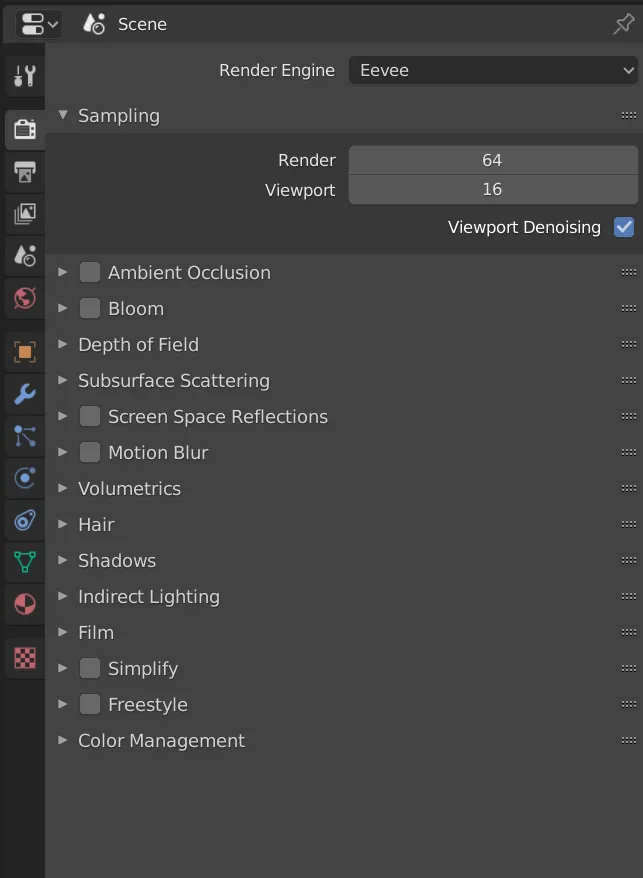
Let’s go through them one by one.
-
Ambient Occlusion
Turn it on
Distancecontrols AO strength. It’s an easy way to add depth to your scene/model. -
Bloom
Turn it on
Threshold: objects below this brightness won’t bloom
Radius: bloom radius
Intensity: bloom strength -
Depth of Field
Leave it
A small trick: use an Empty as the focus target, and tweak aperture in camera settings. -
Subsurface Scattering (SSS)
Leave it
Useful for slightly translucent materials like leaves, jade, skin. -
Screen Space Reflections
Turn it on (important)
(Note: due to how Eevee works, reflections/refractions are quite limited. See the manual.)
Refraction: enable it; also enable refraction inMaterial >>> Settings, otherwise it won’t work
Half Res Trace: disable it. It reduces resource usage.
Trace Precision: default is too low; set it to 1. If it glitches, dial it back a bit
Max Roughness: not sure yet; I only saw a comment recommending 0.85 to “get nice diffuse reflections” -
Motion Blur
Enable if needed
Eevee only supports camera motion blur: it works when the camera moves.
Shuttercontrols shutter time. Higher value means stronger motion blur. -
Volumetrics
Keep defaults
EnableVolumetrics Shadows. -
Hair
Haven’t used it. -
Shadows
Important
“Eevee uses shadow mapping techniques to create correct shadows directly from light sources.” (From the manual)
EnableHigh Bitdepthto improve shadow quality
EnableSoft Shadowsto improve shadow quality
In Method, ESM and VSM are two algorithms: the former is faster, the latter looks better. Pick as needed.
Cube Size: larger value gives higher shadow precision. Adjust as needed.
These two options are optional. If your shadows look bad, try tweaking them.
-
Indirect Lighting
Used when baking indirect lighting for Eevee light probes. I haven’t used it much. -
Film
EnableTransparentto remove the background (no need to cut out), enable as needed. -
Simplify, Freestyle line rendering: skipping here. -
Color Management
(Strictly speaking it’s not Eevee-specific, and it also confused me for a long time. When I fully understand it, I’ll write a separate post.)
Treat it as simple post: tweakLookfor contrast,Exposurefor brightness,Gammahowever you like.
(Gamma is complicated, but Blender’sGammahere is mainly for artistic adjustments. If you want to understand Gamma properly, see 韩世麟 - Gamma校正与线性工作流入门讲解)2019/11/19 update
韩世麟 recommended a creator in a dynamic post: 韦找谁, works in film/TV and posts a vlog every day. Watching helped clear up some of my confusion about color management.
Keywords: Gamma, ACES, color checker
I originally planned a short summary of Ducky’s video, but it got too long and wordy.
Anyway, one image summary: the Eevee settings Ducky recommends:
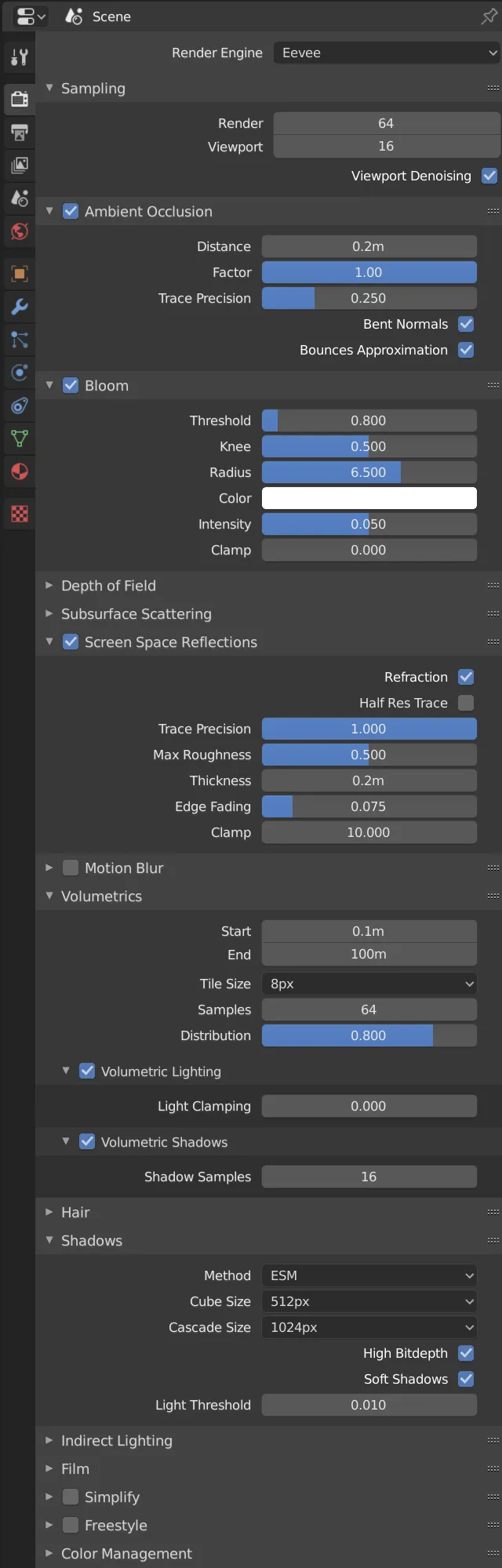
(Time flies. It feels like not long ago, but actually the previous post was almost 3 weeks ago.
(Some time ago I joined the Blender manual translation group and contributed a tiny bit to Blender localization.
Comments