See you later.
2021/04/06 update
Not finished yet. Recording references first; will update later.
Ref
When playing multi-channel audio tracks in stereo, background sounds become too loud and dialogues too quiet:
HDR playback brightness flickers:
Probably HDR videos. I also saw this issue on some HDR videos. You can change the tone-mapping algorithm. Default is hable. I changed it to mobius, which used to be the default algorithm.
Add the line below to the config and try. If still problematic, try other algorithms. It’s documented clearly in the manual.
tone-mapping=mobius
2021/04/06 update
Lazy config
A post I ghosted for a year (coo coo coo~~~
Today I noticed my random config file might be outdated; mpv CLI complained that some options can’t be found.
I skimmed this post VCB bbs - 分享一下自己的mpv配置. It seems mpv added/updated quite a few features and you can achieve similar configs more simply.
After thinking, I decided to stop over-tweaking. Lazy config: make minimal changes and keep it usable.
lua scripts
Checked the scripts folder. The official scripts are under /usr/share/mpv/scripts/. It seems there’s one fewer than what I used. Back up my previous lua scripts:
cp /usr/share/mpv/scripts/* ~/.config/mpv/scripts/config file
Back up mpv.conf:
cp /usr/share/doc/mpv/mpv.conf ~/.config/mpv/Open it and tweak to your preference.
At the end of the file there’s an include option, so you can include other config files. It’s handy to keep custom settings in a separate file.
I added mpv.conf.custom:
# You can also include other configuration files.#include=/path/to/the/file/you/want/to/includeinclude=~/.config/mpv/mpv.conf.customI moved my custom settings into mpv.conf.custom:
#################### Custom settings ##################### ref: http://bbs.vcb-s.com/thread-2730-1-1.html
save-position-on-quit
icc-profile-autoicc-3dlut-size=256x256x256
sub-auto=fuzzysub-file-paths=subsslang=chi,zh-CN,sc,chs
audio-file-auto=fuzzy#audio-file-paths=audioalang=jpn,ja,eng,en
screenshot-format=pngscreenshot-template=mpv-shot-%F-%p-%n# This option is not set by default, and thus will write screenshots to the directory from which mpv was started.# https://mpv.io/manual/stable/#options-screenshot-directoryscreenshot-tag-colorspace=yesscreenshot-high-bit-depth=yesscreenshot-png-compression=0screenshot-png-filter=0screenshot-directory=~/Pictures/mpv_cap/
# Create an empty shaders_cache folder next to mpv.conf to store compiled GPU shaders and speed up startup.# Note: if not under APPDATA, make sure the folder is writable by the user.gpu-shader-cache-dir="~/.config/mpv/shaders_cache"In the config above, lines 21 and 22
# This option is not set by default, and thus will write screenshots to the directory from which mpv was started# <https://mpv.io/manual/stable/#options-screenshot-directory>There used to be a bug: customizing screenshot path would make mpv auto-take two screenshots at startup.
But after reconfiguring this time, it seems the bug is gone.
bug: something something hello world
After configuring, when opening a YouTube video, there was a strange watermark on the image:
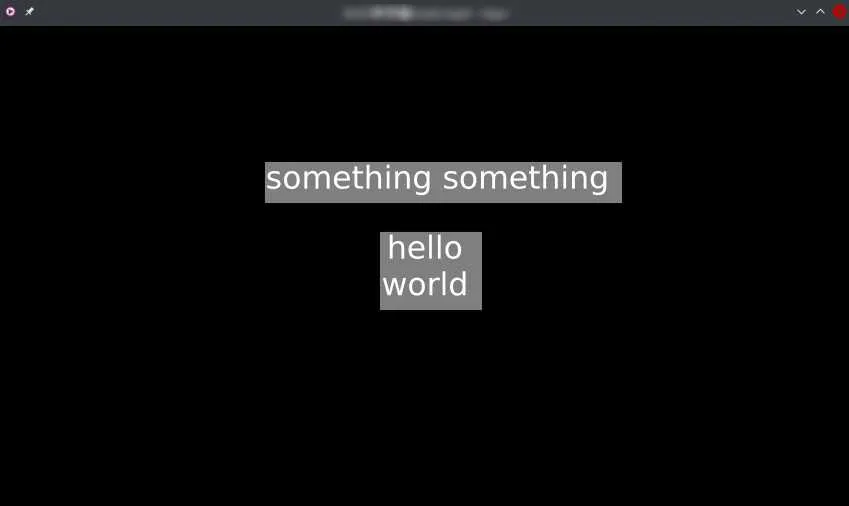
At first I thought it’s an online-video thing, but local videos had the same watermark.
Searched online; couldn’t find the same issue.
Checked config file: fine.
Checked lua scripts and found it’s osd-test.lua… disable it.
The way to find the culprit was
grep hello ~/.config/mpv/scripts/*.lua
Watching YouTube videos/live with mpv
Watching YouTube live with mpv is nice too: run mpv https://..... in terminal, or just drag the URL into an mpv window.
After some trial and error, I ended up with a command to choose a specific resolution, silence CLI logs, and run in background:
mpv --ytdl-raw-options=format=48 https://www.youtube.com/watch?v=xxxxxxxxxx > /dev/null 2>&1 &--ytdl-raw-options=format=481080p is a bit expensive for my proxy, so I lowered quality (fucking GFW).48is theformat id. Runyoutube-dl -F https://www.youtube.com/watch?v=xxxxxxxxxxto list formats.> /dev/null 2>&1discard all CLI output&run mpv in background in a new bash, so you can close current bash
Finally I turned this long command into an alias for one-key livestream watching.
Ref:
mpv manual
stackoverflow - How to select video quality from youtube-dl
stackoverflow - What is /dev/null 2>&1
2021/12/08 update
Found a nice config pack, I’m copying(
- Github - hooke007 - MPV_lazy
- hooke007 - 文档集
TheMPV_lazypack + tutorials look good. I skimmed them.Will reconfigure my mpv someday (coo coo coo
2023/08/12 update
Mpv-Playlistmanager
Tweaked mpv a bit: the playlist font shown with F8 is too large; you can’t even see 5 items in one screen.
I searched how to reduce font size, but there doesn’t seem to be a great solution; changing font size seems to affect all UI widgets.
So I switched to a playlist script: Github - Mpv-Playlistmanager. It seems good.
No special config needed; just put .lua and .conf into the right folders.
At first there was an issue: only the current video was in the playlist; other videos in the folder weren’t loaded.
I checked playlistmanager.conf:
#loadfiles at startup if 1 or more items in playlistloadfiles_on_start=yesSet loadfiles_on_start to yes and it will load all videos in the folder.
By default it also loads image files. In the loadfiles_filetypes setting, I don’t need images, so I removed the corresponding file extensions.
mpv-osc-modern-f
Found a nice on-screen controller that looks much better than the built-in one, so I switched too: Github - mpv-osc-modern-f
No special config; follow the project instructions, then tweak to your preference.
Github - thumbfast, a progressbar thumbnail script, is also good. Installed it as well.
There are many more interesting scripts. Will tweak more when I have time~~ (coo coo coo~~
Github - Awesome mpv, a navigation of useful mpv resources
Github - mpv-scripts, a collection by the Mpv-Playlistmanager author
Comments